
Repair 16: How to Decide What to Work on Using Post-it Notes
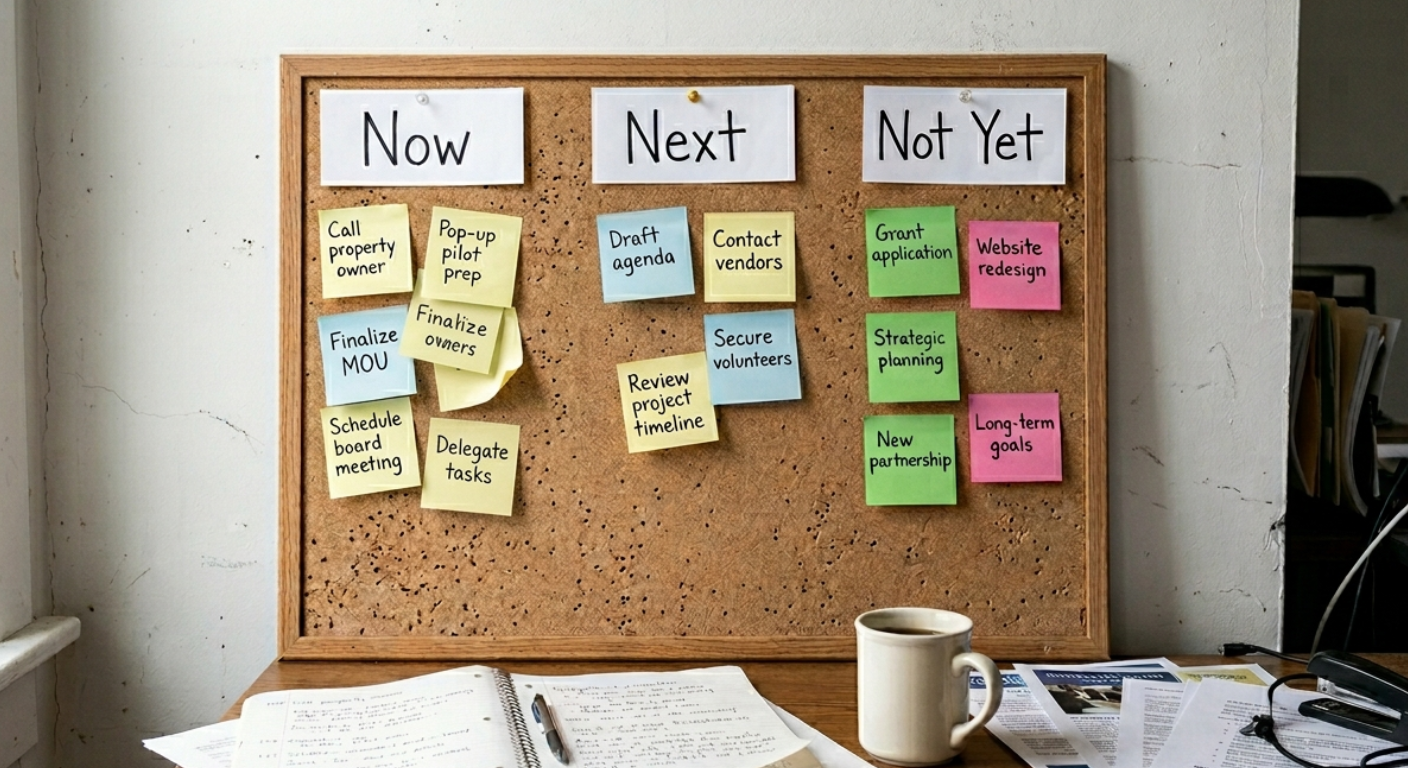
A simple way to prioritize without software
Your list is long. Everything on it feels important. And deciding what to work on next has become its own project.
This isn't an effort problem. It's a visibility problem. When work lives in your head, on scattered notes, or buried in a digital tool you barely open, you can't see the tradeoffs clearly. So you default to whatever feels most urgent, which is rarely the same thing as what actually matters most.
The fix costs about $3.00 and works on any flat surface.
Why digital tools often make this worse
Project management software is great for teams with predictable workflows. Downtown work isn't that. Your day is interrupted constantly, priorities shift mid-week, and the system has to be something you'll actually use when things get chaotic. Most people stop checking their apps exactly when they need them most.
A wall of Post-it notes doesn't require logging in. You can see everything at once. And the physical act of moving a note from one column to another is more satisfying than clicking a checkbox, which matters more than it sounds.
Step 1: Write everything down, one idea per note
Start by getting everything out of your head. Use three colors and treat each one as a different kind of work.
Yellow notes are tasks - Single actions you can complete in one sitting. Send the follow-up email. Call the property owner. Review the event layout. These are the things that fill your day.
Blue notes are projects - Anything with multiple steps that stretches over days or weeks. The downtown cleanup plan. The pop-up retail pilot. Board retreat planning. These require sustained attention, not just a spare hour.
Green notes are ideas - Things you want to do eventually, grant concepts you haven't developed yet, longer-term thoughts that deserve space but not urgency. They matter. They just don't belong in your week yet.
This step alone tells you something useful. If you've got 20 yellow notes and 2 blue ones, you're in task mode and your projects are stalling. If you've got 15 green notes, you're in planning mode and not enough is actually moving.
Step 2: Set up three columns
Label three areas on a wall, whiteboard, or table.
Now. Next. Not Yet.
No dates. No percentages. No complexity. Just three honest buckets.
Step 3: Place notes based on capacity, not hope
For each note, ask three questions before placing it. Do I have time for this right now? Do I have what I need to start? Is this actually mine to move?
If the answer to any of those is no, it doesn't belong in Now. This isn't about how important something is. It's about whether you can actually work on it this week. Importance without capacity is just guilt.
Most people stuff too much into Now because they're optimistic about their week. Be honest instead.
Step 4: Limit Now to five items
Once you've placed everything, look at your Now column. If it has more than five items, you haven't prioritized. You've just moved your list to a wall.
A healthy Now column has a few yellow tasks, 1 or 2 blue projects, and no green ideas.
If you're seeing mostly green, you're planning instead of doing.
If it's all yellow with no blue projects, you're busy but not building anything.
Five items feels tight. That's the point.
Step 5: Add pink for things that shouldn't be yours
This one's optional but worth trying. Pink notes are for things you're holding that belong somewhere else. Tasks someone else could handle. Items waiting on a decision that isn't yours to make. Work that's been on your list so long it may not matter anymore.
Pink notes aren't failures. They're relief. Seeing them in a separate color makes it easier to actually let them go.
Step 6: Review it every week
The system only works if you touch it regularly. Once a week, move one blue project closer to Now, clear out completed yellow tasks, and leave the green ideas alone unless something real has changed.
This takes about ten minutes. It's the ten minutes that keeps the rest of your week from being reactive.
What to do this week
⬜ Buy a pack of Post-it notes in at least 3 colors
⬜ Write down everything pulling at your attention
⬜ Set up three columns: Now, Next, Not Yet
⬜ Place your notes honestly, not optimistically
⬜ Cut Now down to 5 items
⬜ Take a photo so you have a reference when the wall gets moved
The goal isn't a perfect system. It's a true picture of where your attention is actually going.
This kind of prioritization work is part of what we cover in the Organizational Capacity Building with Reader Area Development. If you're stuck between too many ideas and not enough traction, that's a good place to start.
Want to learn more?
Kanban Prioritization Techniques — Teamhood. A good overview of the visual workflow principles behind this approach, including why limiting work in progress matters more than most people expect.
Kanban vs. Eisenhower: How to Visualize and Prioritize Tasks — Manifestly. Useful if you want to layer a second framework on top of the basic column system once you've got the habit down.
The Downtown Repair Manual is a field guide for fixing common downtown problems, one repair at a time.